# Centrifugeuse réfrigérée
Centrifugeuse à rotor interchangeables (1,5mL, 15mL, 50mL), permettant de travailler dans une gamme de température allant de l'ambiante à 4°C ou moins. 17000 rpm max.
# Consignes d'utilisation : Centrifugeuse réfigérée (Sirena)
**1 PRINCIPE ET APPLICATIONS**
[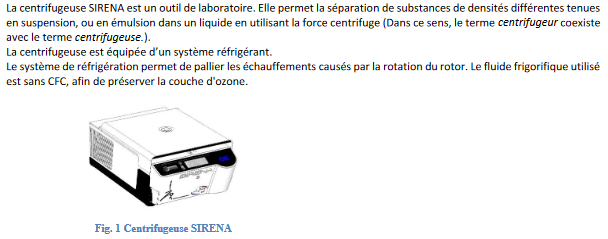](https://wiki.fablab.sorbonne-universite.fr/BookStack/uploads/images/gallery/2025-01/4gpimage.png)
[](https://wiki.fablab.sorbonne-universite.fr/BookStack/uploads/images/gallery/2025-01/92Rimage.png)
Recherches : de la microbiologie à la recherche moléculaire en passant par la biochimie.
**2 INTERDICTIONS**
[](https://wiki.fablab.sorbonne-universite.fr/BookStack/uploads/images/gallery/2025-01/vk5image.png)
**3 CONSIGNES DE SECURITE**
[](https://wiki.fablab.sorbonne-universite.fr/BookStack/uploads/images/gallery/2025-01/pROimage.png)
[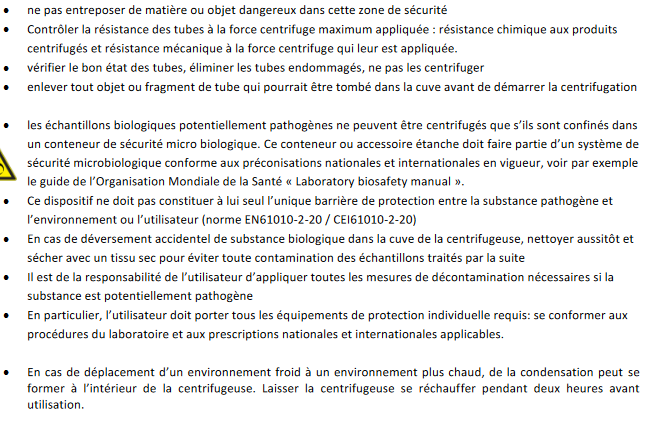](https://wiki.fablab.sorbonne-universite.fr/BookStack/uploads/images/gallery/2025-01/GfVimage.png)
[](https://wiki.fablab.sorbonne-universite.fr/BookStack/uploads/images/gallery/2025-01/2lEimage.png)
**4 CARACTERISTIQUES**
[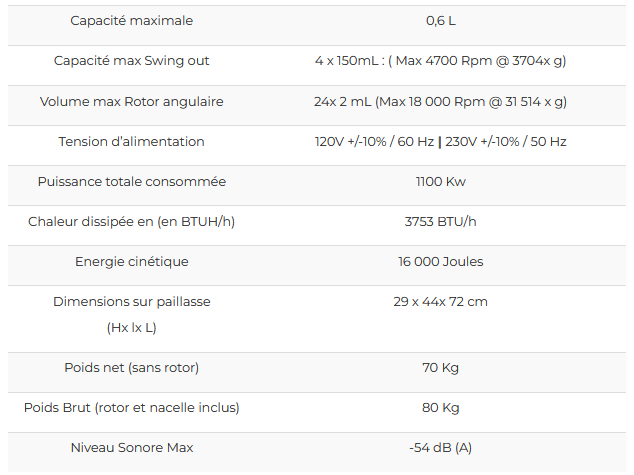](https://wiki.fablab.sorbonne-universite.fr/BookStack/uploads/images/gallery/2025-01/VR1image.png)
**5 PROCEDURE D'UTILISATION**
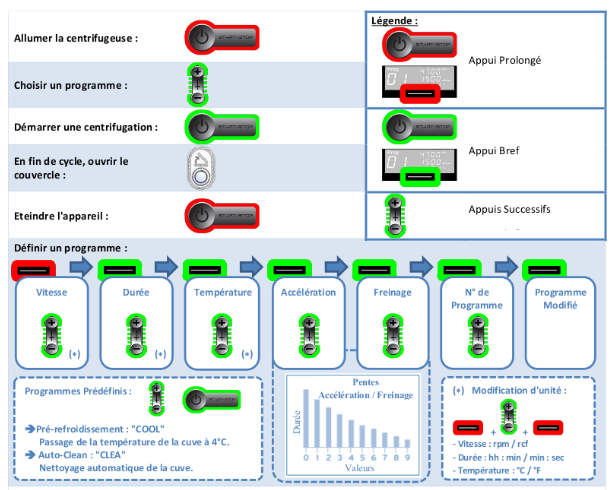
**SCHEMA RECAPITULATIF BOUTONS/PROGRAMMES/UNITES**
[](https://wiki.fablab.sorbonne-universite.fr/BookStack/uploads/images/gallery/2025-01/2Ynimage.png)
[](https://wiki.fablab.sorbonne-universite.fr/BookStack/uploads/images/gallery/2025-01/aQqimage.png)
**DESCRIPTION**
[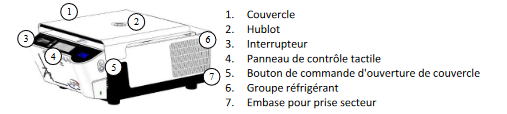](https://wiki.fablab.sorbonne-universite.fr/BookStack/uploads/images/gallery/2025-01/yjaimage.png)
**ACTIONNER LE COUVERCLE**
[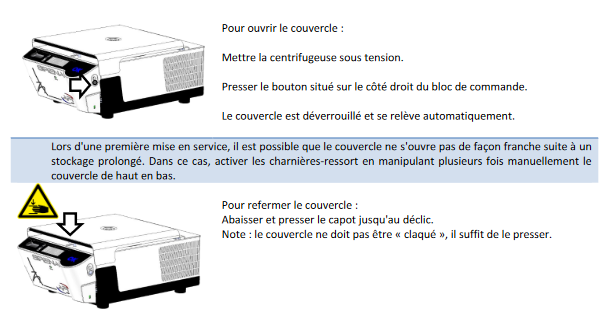](https://wiki.fablab.sorbonne-universite.fr/BookStack/uploads/images/gallery/2025-01/hjcimage.png)
**PRE-REFROIDISSEMENT**
**[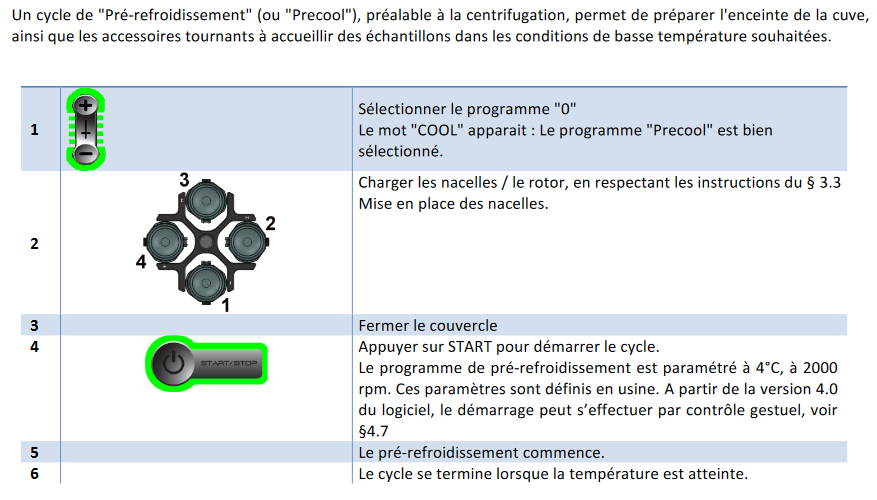](https://wiki.fablab.sorbonne-universite.fr/BookStack/uploads/images/gallery/2025-01/CVOimage.png)**
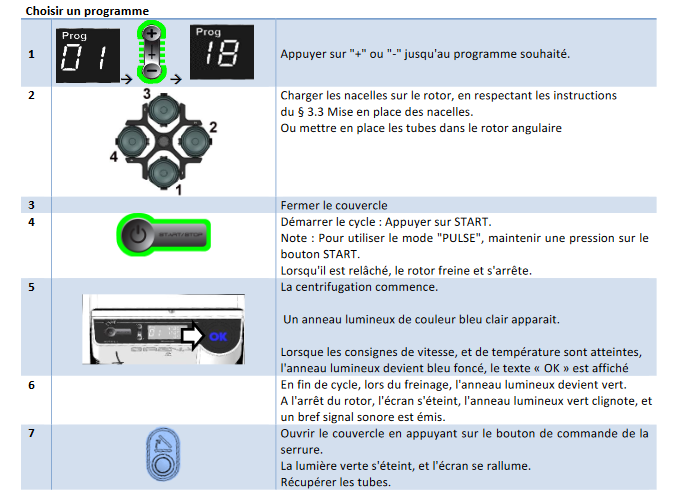
**BOUTONS ET DESCRIPTIONS DE L'INTERFACE + CHOIX DU PROGRAMME. IMPORTANT: INFOS PRECISES SUR LE PARAMETRAGE ENSUITE (exemple: affichage du numéro de programme sous "prog" lorsqu'on appuie sur + ou -).**
[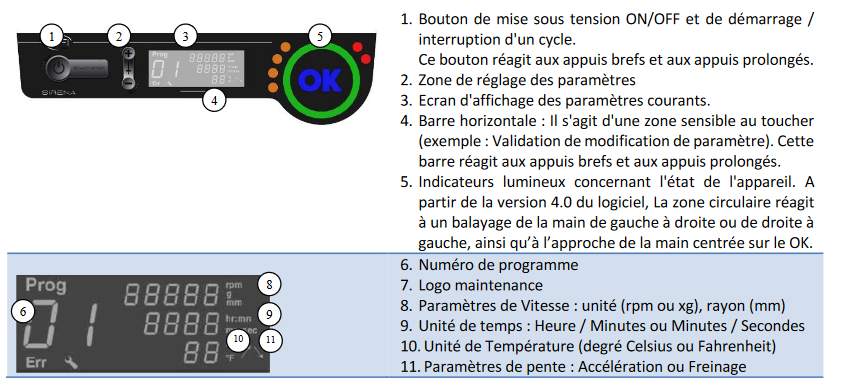](https://wiki.fablab.sorbonne-universite.fr/BookStack/uploads/images/gallery/2025-01/NiVimage.png)
[](https://wiki.fablab.sorbonne-universite.fr/BookStack/uploads/images/gallery/2025-01/6svimage.png)
[](https://wiki.fablab.sorbonne-universite.fr/BookStack/uploads/images/gallery/2025-01/a2limage.png)
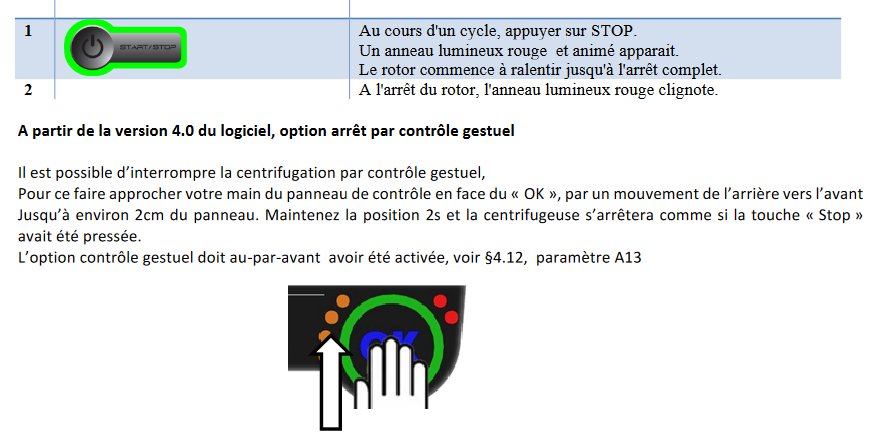
**INTERROMPRE UNE CENTRIFUGATION**
[](https://wiki.fablab.sorbonne-universite.fr/BookStack/uploads/images/gallery/2025-01/LFoimage.png)
***MODE PARAMETRAGE***
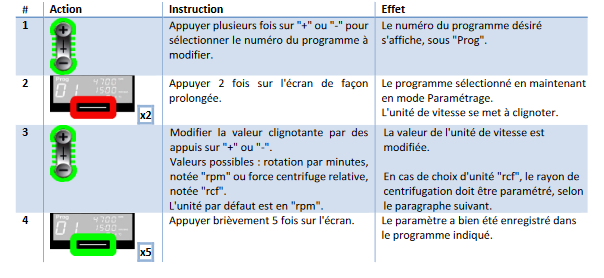
**Reglage de l'unité de vitesse/force centrifuge**
[](https://wiki.fablab.sorbonne-universite.fr/BookStack/uploads/images/gallery/2025-01/hW2image.png)
**Réglage du rayon de centrifugation**
[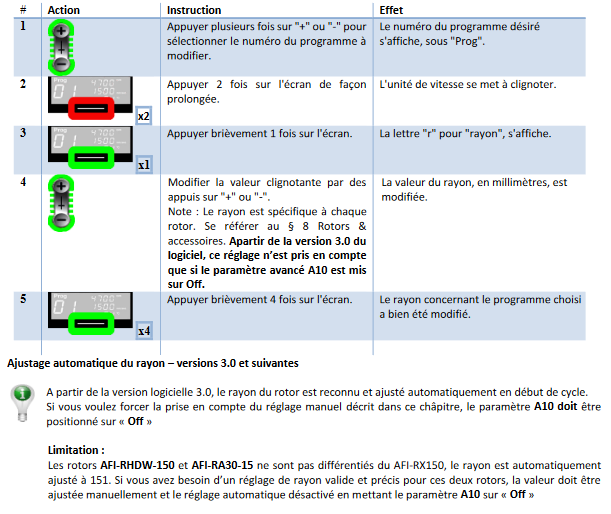](https://wiki.fablab.sorbonne-universite.fr/BookStack/uploads/images/gallery/2025-01/HlNimage.png)
**Réglage de l'unité du temps**
[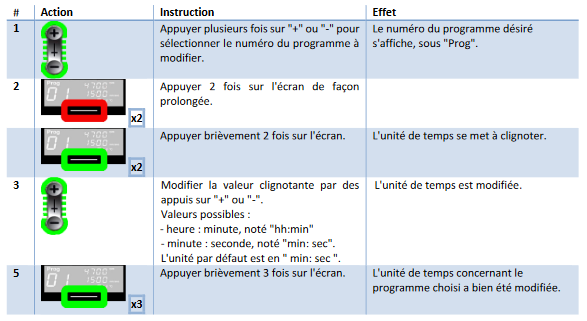](https://wiki.fablab.sorbonne-universite.fr/BookStack/uploads/images/gallery/2025-01/t8vimage.png)
**Réglage de la température**
[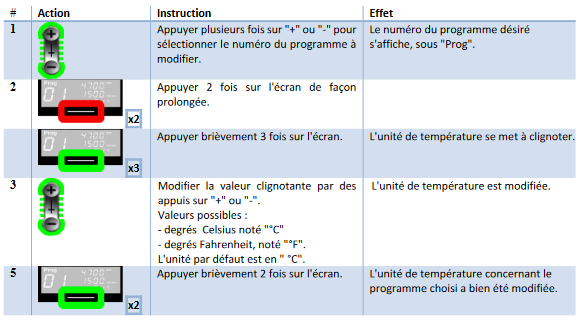](https://wiki.fablab.sorbonne-universite.fr/BookStack/uploads/images/gallery/2025-01/hPOimage.png)
**Paramètres avancés**
[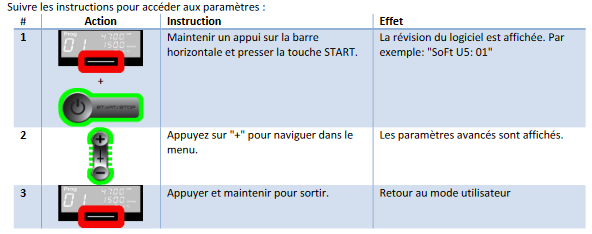](https://wiki.fablab.sorbonne-universite.fr/BookStack/uploads/images/gallery/2025-01/LS0image.png)
**OUVERTURE AUTOMATIQUE DU COUVERCLE**
[](https://wiki.fablab.sorbonne-universite.fr/BookStack/uploads/images/gallery/2025-01/fKvimage.png)
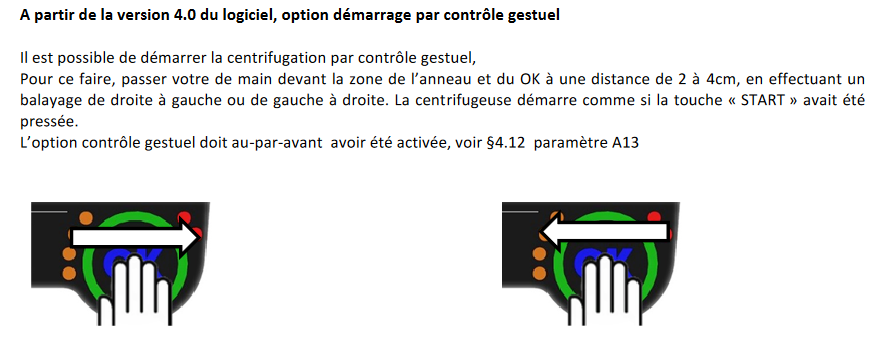
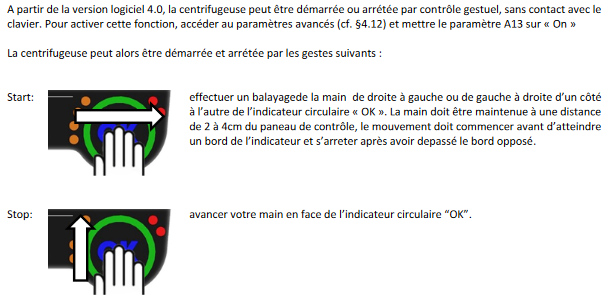
**CONTROL GESTUEL**
[](https://wiki.fablab.sorbonne-universite.fr/BookStack/uploads/images/gallery/2025-01/c0Wimage.png)
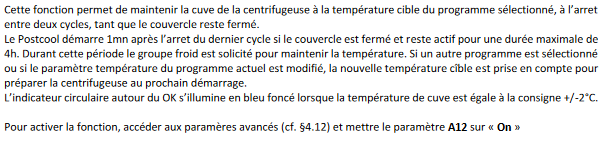
**REFROIDISSEMENT A L'ARRET POST-COOL**
[](https://wiki.fablab.sorbonne-universite.fr/BookStack/uploads/images/gallery/2025-01/DhZimage.png)
**6 SOURCES**
file:///C:/Users/FabLabUser/Downloads/FR%20-%20SIRENA%20Manuel%20Utilisateur%20-%20Rev%201.3.pdf
https://www.afigroups.fr/sirena
**Allumer** en maintenant appuyer le bouton 1 Power. Ce bouton réagit aux appuis brefs et aux appuis prolongés.
**Choisir un programme** : appuyer sur + ou - (étape 2).
**Lancer une centrifugation** : appuyer brièvement sur power
**Modifier un programme :**
⦁ choisir le programme à modifier avec le '+' ou '-'
⦁ maintenir longtemps la barre tactile en bas de l'écran jusqu'à ce que la vitesse se mette a clignoter
(pour modifier la durée, appuyer une fois de plus brièvement et suivez le protocole )
(pour modifier la température, appuyer 2 fois )
(pour modifier accélération, appuyer 3 fois)
⦁ Modifier la valeur avec le '+' et le '-'
⦁ Pour valider le programme, appuyer brièvement 6 fois sur la barre en bas de l’écran.
(pour la durée, appuyer 5 fois brièvement pour valider)
(pour la température, appuyer 4 fois brièvement pour valider)
(pour l'accélération , appuyer 3 fois brièvement pour valider)
cela validera les autres paramètres non modifiés
**Utiliser le programme:**
⦁ choisir le programme avec le '+' et '-'
⦁ mettre les tubes dans le rotor et fermer le couvercle
⦁ appuyer brièvement sur le bouton power
lorsque les conditions du programme sont atteintes, il est affiché un 'OK'
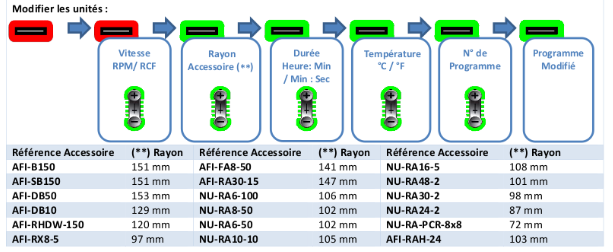
**les unités par défauts :**
vitesse: tour par min (rpm)
durée: min:sec
température : degré Celsius
pente d'Accélération : plus la valeur est grande, plus le temps d’accélération diminue