# Arduino - Alina Pintea & Mehdi Chaabi & Mathias Benezeth

### Objectif du projet :

Construire un programme sur Arduino permettant d'allumer une LED rouge si la température est supérieure à 25°C et une LED bleue si la température est inférieure à 25°C.

### Étapes réalisées :

#### Étape 1 : Rassemblement des composants pour le circuit

- 4 câbles
- Capteur de température
- 2 LED (rouge et bleue)
- 2 résistances
- Un câble reliant l'ordinateur au circuit
- Une plaquette

#### Étape 2 : Montage du circuit avec démonstration

Le montage du circuit a été effectué conformément au schéma suivant :

#### Étape 3 : Programmation pour contrôler les LED en fonction de la température

Voici le code Arduino utilisé pour contrôler les LED en fonction de la température :

<span style="font-size: 10.5pt; font-family: Consolas; color: #728e00;">\#define</span><span style="font-size: 10.5pt; font-family: Consolas; color: #4e5b61;"> </span><span style="font-size: 10.5pt; font-family: Consolas; color: #d35400;">LEDBLEU</span><span style="font-size: 10.5pt; font-family: Consolas; color: #4e5b61;"> </span><span style="font-size: 10.5pt; font-family: Consolas; color: #005c5f;">10</span><span style="font-size: 10.5pt; font-family: Consolas; color: #95a5a6;"> // définition de la led bleue</span>

<span style="font-size: 10.5pt; font-family: Consolas; color: #728e00;">\#define</span><span style="font-size: 10.5pt; font-family: Consolas; color: #4e5b61;"> </span><span style="font-size: 10.5pt; font-family: Consolas; color: #d35400;">LEDROUGE</span><span style="font-size: 10.5pt; font-family: Consolas; color: #4e5b61;"> </span><span style="font-size: 10.5pt; font-family: Consolas; color: #005c5f;">9</span><span style="font-size: 10.5pt; font-family: Consolas; color: #95a5a6;"> // définition de la led rouge</span>

<span style="font-size: 10.5pt; font-family: Consolas; color: #728e00;">\#define</span><span style="font-size: 10.5pt; font-family: Consolas; color: #4e5b61;"> </span><span style="font-size: 10.5pt; font-family: Consolas; color: #d35400;">CapteurTemp</span><span style="font-size: 10.5pt; font-family: Consolas; color: #4e5b61;"> A0</span><span style="font-size: 10.5pt; font-family: Consolas; color: #95a5a6;"> //définit le pin pour le capteur de la température</span>

<span style="font-size: 10.5pt; font-family: Consolas; color: #4e5b61;"> </span>

<span style="font-size: 10.5pt; font-family: Consolas; color: #00979d;">void</span><span style="font-size: 10.5pt; font-family: Consolas; color: #4e5b61;"> </span><span style="font-size: 10.5pt; font-family: Consolas; color: #d35400;">setup</span><span style="font-size: 10.5pt; font-family: Consolas; color: #434f54;">(){</span>

<span style="font-size: 10.5pt; font-family: Consolas; color: #4e5b61;"> </span><span style="font-size: 10.5pt; font-family: Consolas; color: #d35400;">pinMode</span><span style="font-size: 10.5pt; font-family: Consolas; color: #434f54;">(</span><span style="font-size: 10.5pt; font-family: Consolas; color: #4e5b61;">LEDROUGE, OUTPUT</span><span style="font-size: 10.5pt; font-family: Consolas; color: #434f54;">)</span><span style="font-size: 10.5pt; font-family: Consolas; color: #4e5b61;">;</span><span style="font-size: 10.5pt; font-family: Consolas; color: #95a5a6;"> //Configure le pin comme sortie pour la LED Rouge </span>

<span style="font-size: 10.5pt; font-family: Consolas; color: #4e5b61;"> </span><span style="font-size: 10.5pt; font-family: Consolas; color: #d35400;">pinMode</span><span style="font-size: 10.5pt; font-family: Consolas; color: #434f54;">(</span><span style="font-size: 10.5pt; font-family: Consolas; color: #4e5b61;">LEDBLEU, OUTPUT</span><span style="font-size: 10.5pt; font-family: Consolas; color: #434f54;">)</span><span style="font-size: 10.5pt; font-family: Consolas; color: #4e5b61;">;</span><span style="font-size: 10.5pt; font-family: Consolas; color: #95a5a6;"> //Configure le pin comme sortie pour la LED Bleu</span>

<span style="font-size: 10.5pt; font-family: Consolas; color: #4e5b61;"> </span><span style="font-size: 10.5pt; font-family: Consolas; color: #d35400;">pinMode</span><span style="font-size: 10.5pt; font-family: Consolas; color: #434f54;">(</span><span style="font-size: 10.5pt; font-family: Consolas; color: #4e5b61;">CapteurTemp, INPUT</span><span style="font-size: 10.5pt; font-family: Consolas; color: #434f54;">)</span><span style="font-size: 10.5pt; font-family: Consolas; color: #4e5b61;">;</span><span style="font-size: 10.5pt; font-family: Consolas; color: #95a5a6;"> //Configure le pin comme sortie pour le capteur de température </span>

<span style="font-size: 10.5pt; font-family: Consolas; color: #434f54;">}</span>

<span style="font-size: 10.5pt; font-family: Consolas; color: #4e5b61;"> </span>

<span style="font-size: 10.5pt; font-family: Consolas; color: #00979d;">void</span><span style="font-size: 10.5pt; font-family: Consolas; color: #4e5b61;"> </span><span style="font-size: 10.5pt; font-family: Consolas; color: #d35400;">loop</span><span style="font-size: 10.5pt; font-family: Consolas; color: #434f54;">(){</span>

<span style="font-size: 10.5pt; font-family: Consolas; color: #4e5b61;"> </span><span style="font-size: 10.5pt; font-family: Consolas; color: #00979d;">int</span><span style="font-size: 10.5pt; font-family: Consolas; color: #4e5b61;"> valeurCapteurTemp = </span><span style="font-size: 10.5pt; font-family: Consolas; color: #d35400;">analogRead</span><span style="font-size: 10.5pt; font-family: Consolas; color: #434f54;">(</span><span style="font-size: 10.5pt; font-family: Consolas; color: #4e5b61;">CapteurTemp</span><span style="font-size: 10.5pt; font-family: Consolas; color: #434f54;">)</span><span style="font-size: 10.5pt; font-family: Consolas; color: #4e5b61;">;</span>

<span style="font-size: 10.5pt; font-family: Consolas; color: #4e5b61;"> </span><span style="font-size: 10.5pt; font-family: Consolas; color: #00979d;">float</span><span style="font-size: 10.5pt; font-family: Consolas; color: #4e5b61;"> tension = </span><span style="font-size: 10.5pt; font-family: Consolas; color: #434f54;">(</span><span style="font-size: 10.5pt; font-family: Consolas; color: #4e5b61;">valeurCapteurTemp/</span><span style="font-size: 10.5pt; font-family: Consolas; color: #005c5f;">1023.0</span><span style="font-size: 10.5pt; font-family: Consolas; color: #434f54;">)</span><span style="font-size: 10.5pt; font-family: Consolas; color: #4e5b61;">\*</span><span style="font-size: 10.5pt; font-family: Consolas; color: #005c5f;">5.0</span><span style="font-size: 10.5pt; font-family: Consolas; color: #4e5b61;">;</span><span style="font-size: 10.5pt; font-family: Consolas; color: #95a5a6;"> // Convertit la valeur analogique en tension (5V)</span>

<span style="font-size: 10.5pt; font-family: Consolas; color: #4e5b61;"> </span><span style="font-size: 10.5pt; font-family: Consolas; color: #00979d;">float</span><span style="font-size: 10.5pt; font-family: Consolas; color: #4e5b61;"> temperature = tension \* 25</span><span style="font-size: 10.5pt; font-family: Consolas; color: #005c5f;">.0</span><span style="font-size: 10.5pt; font-family: Consolas; color: #4e5b61;">;</span><span style="font-size: 10.5pt; font-family: Consolas; color: #95a5a6;"> //Convertit la tension en température en degrés Celsius</span>

<span style="font-size: 10.5pt; font-family: Consolas; color: #4e5b61;"> </span>

<span style="font-size: 10.5pt; font-family: Consolas; color: #4e5b61;"> </span><span style="font-size: 10.5pt; font-family: Consolas; color: #728e00;">if</span><span style="font-size: 10.5pt; font-family: Consolas; color: #4e5b61;"> </span><span style="font-size: 10.5pt; font-family: Consolas; color: #434f54;">(</span><span style="font-size: 10.5pt; font-family: Consolas; color: #4e5b61;">temperature &lt; 25</span><span style="font-size: 10.5pt; font-family: Consolas; color: #005c5f;">.0</span><span style="font-size: 10.5pt; font-family: Consolas; color: #434f54;">)</span><span style="font-size: 10.5pt; font-family: Consolas; color: #4e5b61;"> </span><span style="font-size: 10.5pt; font-family: Consolas; color: #434f54;">{</span>

<span style="font-size: 10.5pt; font-family: Consolas; color: #4e5b61;"> </span><span style="font-size: 10.5pt; font-family: Consolas; color: #d35400;">digitalWrite</span><span style="font-size: 10.5pt; font-family: Consolas; color: #434f54;">(</span><span style="font-size: 10.5pt; font-family: Consolas; color: #4e5b61;">LEDROUGE, LOW</span><span style="font-size: 10.5pt; font-family: Consolas; color: #434f54;">)</span><span style="font-size: 10.5pt; font-family: Consolas; color: #4e5b61;">;</span>

<span style="font-size: 10.5pt; font-family: Consolas; color: #4e5b61;"> </span><span style="font-size: 10.5pt; font-family: Consolas; color: #d35400;">digitalWrite</span><span style="font-size: 10.5pt; font-family: Consolas; color: #434f54;">(</span><span style="font-size: 10.5pt; font-family: Consolas; color: #4e5b61;">LEDBLEU, HIGH</span><span style="font-size: 10.5pt; font-family: Consolas; color: #434f54;">)</span><span style="font-size: 10.5pt; font-family: Consolas; color: #4e5b61;">;</span>

<span style="font-size: 10.5pt; font-family: Consolas; color: #4e5b61;"> </span><span style="font-size: 10.5pt; font-family: Consolas; color: #434f54;">}</span><span style="font-size: 10.5pt; font-family: Consolas; color: #4e5b61;"> </span><span style="font-size: 10.5pt; font-family: Consolas; color: #728e00;">else</span><span style="font-size: 10.5pt; font-family: Consolas; color: #4e5b61;"> </span><span style="font-size: 10.5pt; font-family: Consolas; color: #434f54;">{</span>

<span style="font-size: 10.5pt; font-family: Consolas; color: #4e5b61;"> </span><span style="font-size: 10.5pt; font-family: Consolas; color: #d35400;">digitalWrite</span><span style="font-size: 10.5pt; font-family: Consolas; color: #434f54;">(</span><span style="font-size: 10.5pt; font-family: Consolas; color: #4e5b61;">LEDROUGE, HIGH</span><span style="font-size: 10.5pt; font-family: Consolas; color: #434f54;">)</span><span style="font-size: 10.5pt; font-family: Consolas; color: #4e5b61;">;</span>

<span style="font-size: 10.5pt; font-family: Consolas; color: #4e5b61;"> </span><span style="font-size: 10.5pt; font-family: Consolas; color: #d35400;">digitalWrite</span><span style="font-size: 10.5pt; font-family: Consolas; color: #434f54;">(</span><span style="font-size: 10.5pt; font-family: Consolas; color: #4e5b61;">LEDBLEU, LOW</span><span style="font-size: 10.5pt; font-family: Consolas; color: #434f54;">)</span><span style="font-size: 10.5pt; font-family: Consolas; color: #4e5b61;">;</span>

<span style="font-size: 10.5pt; font-family: Consolas; color: #4e5b61;"> </span><span style="font-size: 10.5pt; font-family: Consolas; color: #434f54;">}</span>

<span style="font-size: 10.5pt; font-family: Consolas; color: #434f54;">}</span>

#### Étape 4 : Présentation des résultats   


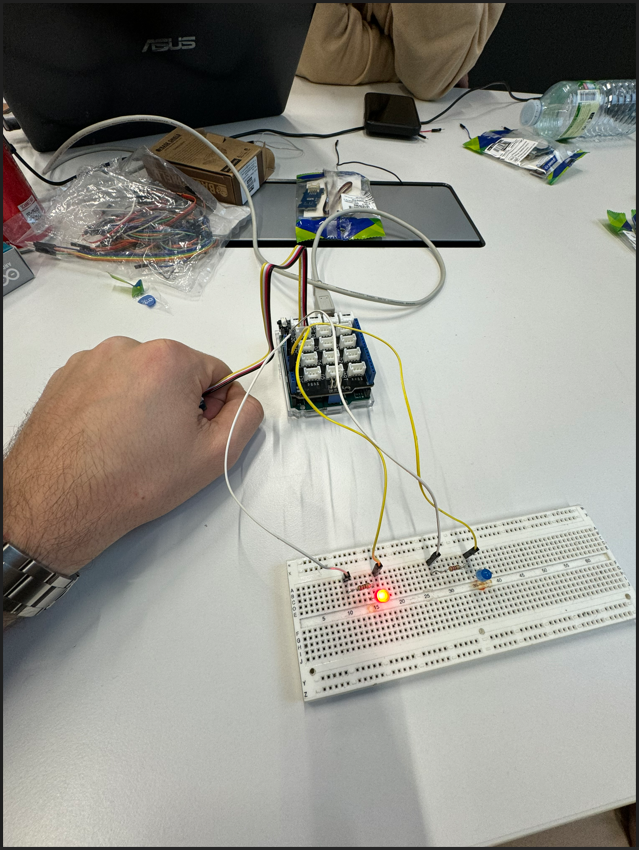
La LED Rouge s'allume car la température est supérieur à 25°C

[![image.png](https://wiki.fablab.sorbonne-universite.fr/BookStack/uploads/images/gallery/2024-02/scaled-1680-/UKaimage.png)](https://wiki.fablab.sorbonne-universite.fr/BookStack/uploads/images/gallery/2024-02/UKaimage.png)
\-------------------------------------------------------------------------------------------------------------

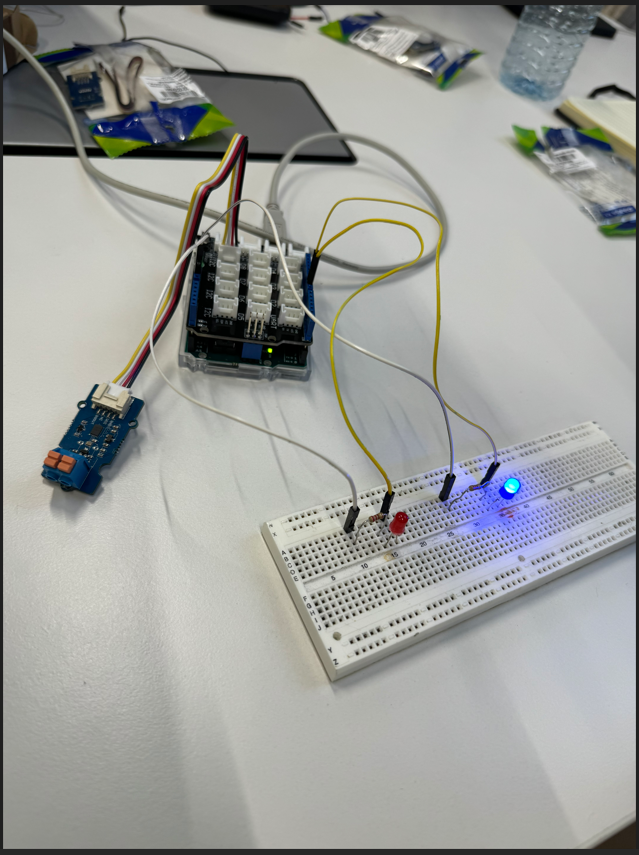
La LED Bleu s'allume car la température est inférieur à 25°C

[![image.png](https://wiki.fablab.sorbonne-universite.fr/BookStack/uploads/images/gallery/2024-02/scaled-1680-/8Btimage.png)](https://wiki.fablab.sorbonne-universite.fr/BookStack/uploads/images/gallery/2024-02/8Btimage.png)